~/blog /
Turning Two Static Websites into Astro with GitHub Copilot App
How I used focused Copilot App sessions to migrate two static company sites to Astro and Markdown
Intro
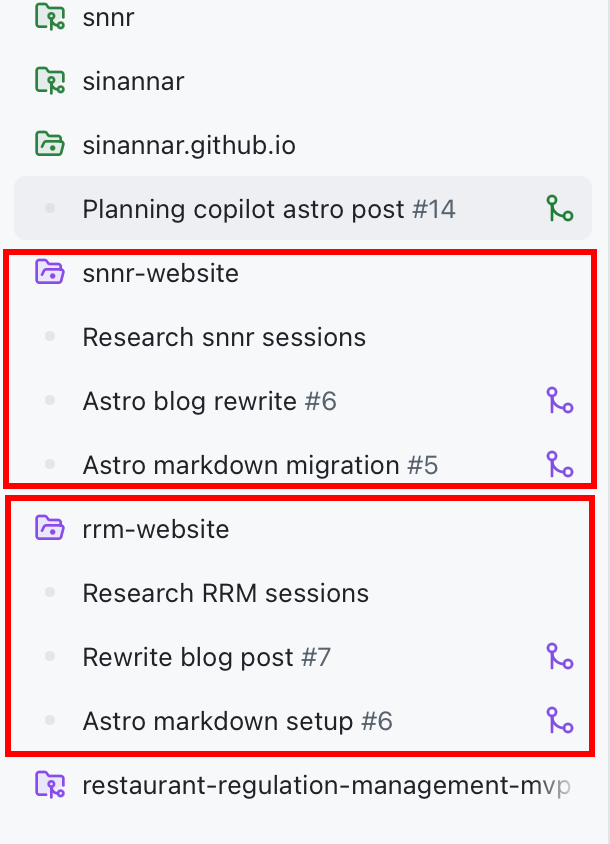
I recently used the GitHub Copilot App to migrate two static websites from plain HTML/CSS into Astro:
Both were simple static sites, and that simplicity was useful. They deployed easily to GitHub Pages and did not need servers, databases, or complicated infrastructure. But as soon as I wanted them to become easier to maintain, especially for blog posts and repeated content updates, raw static files started to feel limiting.
This was a good use case for the Copilot App. I did not need a big product rewrite. I needed focused migration work across two repositories, with each repo getting its own branch, workspace, terminal, build, and pull request.
The Workflow I Used
The main thing I like about the Copilot App is the session model. Instead of mixing all work together, I created a focused session for each website migration.
For the Snnr site, the session was Astro markdown migration. It worked on the branch sinannar-astro-markdown-migration and produced PR #5: Migrate site to Astro markdown.
For the RRM site, the session was Astro markdown setup. It worked on the branch sinannar-astro-markdown-setup and produced PR #6: Convert site to Astro Markdown setup.
That separation mattered. Each session had one clear goal, one repository context, and one PR as the final handoff. I could review the output as normal GitHub changes instead of trying to mentally track a long-running chat with mixed edits.
It also made the work feel more like a small product workflow than a single code-generation step. The first pass created the migration, then follow-up turns and smaller sessions handled review feedback, deployment details, and content polish.
What I Asked Copilot App To Do
The important part was not just saying “convert this to Astro.” I wanted the resulting sites to be easier to update later, so the prompt needed to describe the architecture I wanted:
- keep the sites static and GitHub Pages friendly
- introduce Astro pages, layouts, and components
- move editable content into Markdown/content collections
- add a Markdown-backed blog
- preserve the existing design and marketing content
- update the deployment workflow to build Astro and publish
dist/ - keep custom domains working through
public/CNAME - update repo instructions so future Copilot sessions understand the new structure
That last point is easy to miss. If you are using AI agents repeatedly in the same repository, documentation and agent instructions matter. After the migration, I wanted future sessions to edit Markdown content collections and Astro components, not recreate the old static index.html pattern.
On the Snnr site, that meant updating the local Snnr Web Builder agent so it knew about Astro routes, Markdown content collections, shared styles, and the validation expectations. This was not just for the current PR; it was to make the next Copilot App session start from the new architecture.
First Migration: Snnr Website
The Snnr website migration was the broader one.
The Copilot App session moved the site from a raw static setup into an Astro project with structured content collections for homepage metadata, services, products, careers, contact details, and blog posts. It also recreated the homepage using Astro layouts, components, pages, and global styles.
The result was not just “same site, different framework.” The site became more content-friendly. A service card or blog post can now live as Markdown instead of being hard-coded inside page markup.
The PR also updated GitHub Pages deployment so it installs dependencies, runs the Astro build, and uploads dist/. The custom domain, snnr.co.nz, stayed preserved through public/CNAME.
That is the kind of migration detail I still want to review carefully myself. AI can do the repetitive work, but deployment and domain settings are areas where I want to make sure nothing subtle breaks.
The review pass also led to practical fixes that were easy to miss in a framework migration: a real mailto: target for the contact form, better labels, a favicon, canonical links, no duplicate contact source data, and disabled product actions rendered as non-links instead of href="#".
Second Migration: RRM Website
The RRM website migration followed the same pattern, but the scope was more focused.
RRM is a product landing page, so the session rebuilt the landing page as Astro pages, layout, navigation, footer, and shared styles while preserving the existing marketing copy and responsive behavior. It also added a Markdown-backed blog with a blog index, dynamic post route, and starter post.
Because I had just done the Snnr migration, this second session felt like applying the same recipe again:
- static output
- Astro structure
- Markdown blog content
- GitHub Pages build workflow
- custom domain preserved for
rrm.co.nz - repo instructions updated for future content work
This is where Copilot App works well for me. Once the intended pattern is clear, I can run a focused session in another repo and then review the PR rather than doing all the mechanical conversion by hand.
The RRM migration also had a concrete deployment lesson. GitHub Pages sites can behave differently when they are deployed under a project path versus a root custom domain. The session corrected that by removing the project base path, setting the Astro site URL to https://rrm.co.nz, and adding public/CNAME so the generated artifact preserved the domain.
Another small review improvement was removing manual blog slug frontmatter and letting Astro derive post URLs from content entry IDs and filenames. That made authoring future Markdown posts simpler and reduced one more thing to keep in sync.
Pull Requests as the Handoff
I like that the output of these sessions became normal pull requests.
For Snnr, the migration landed in Snnr-Limited/snnr-website#5. For RRM, it landed in Snnr-Limited/rrm-website#6.
That gave me a familiar review point:
- inspect the file structure
- check what changed in the deployment workflow
- verify the Markdown/content schema
- confirm the custom domain files are still there
- make sure the site still builds
I also used rubber-duck review as part of this step. After Copilot App produced the PR, I used a separate review pass to challenge the changes: does the structure make sense, did the migration preserve the important behavior, and are there any hidden deployment or maintainability problems?
That rubber-duck pass was useful because it was not only checking whether the site built. It pushed on production details: CNAME output, GitHub Pages configuration, content duplication, fake links, form behavior, and whether the Markdown authoring model was clean enough to keep using.
The Copilot App session does the implementation work, but the PR and review pass are where I switch back into engineer mode. I still want to understand what changed, why it changed, and whether the result is maintainable.
Follow-Up Sessions for Polish
After the migration PRs, I also used smaller follow-up sessions for content polish.
For Snnr, I had an Astro blog rewrite session. For RRM, I had a Rewrite blog post session. These were intentionally smaller than the migration sessions. They were not about changing the architecture again; they were about improving the content after the foundation was in place.
In both repos, the first Markdown post became part of the migration story. Instead of leaving generic starter content behind, the follow-up sessions rewrote the first posts to explain why each site moved from static HTML to Astro and Markdown-backed content.
That is another workflow lesson for me: do not overload one AI session with every possible follow-up. Let the migration session migrate. Then use a smaller session for polish once the structure exists.
Using Orchestrate While Writing This Post
While writing this blog post, I used orchestrate in the Copilot App to gather the session history behind the work.
Instead of manually jumping between repositories and trying to reconstruct everything from memory, I spawned two research sessions: one in snnr-website and one in rrm-website. Each session looked at the relevant migration PR, follow-up PR, commits, validation notes, and local Copilot App session history, then reported back with a concise summary.
That helped me add the details above: the Snnr agent update, the rubber-duck review feedback, the RRM custom-domain fix, the filename-based blog slug cleanup, and the follow-up rewrite sessions. In other words, I used the same session-based workflow to write the story about the session-based workflow.
What I Learned
The biggest lesson is that Copilot App is most useful when I give it a clear destination, not just a vague command.
“Convert this static site to Astro” might get the job started, but “convert this static site to an Astro static site with Markdown content collections, a blog, GitHub Pages deployment, preserved custom domain, and updated repo instructions” gives the session a much better target.
I also learned that the session boundary matters. One repo, one goal, one branch, one PR. That kept the work easy to review and easy to merge.
The sequence mattered too: build the foundation, review it, fix the deployment and authoring details, merge it, then use a smaller session to improve the content. That is a more reliable pattern than trying to make one huge prompt solve architecture, deployment, review feedback, and editorial polish all at once.
The final result is that both sites are still static and simple to host, but they are no longer awkward to update. Future content can be written in Markdown, shared layout belongs in Astro components, and deployment still goes through GitHub Pages.
Conclusion
This is the kind of work where GitHub Copilot App fits naturally into my workflow. It handled the repetitive migration steps, kept each repo isolated in its own session, and produced PRs I could review like any other engineering change.
I still owned the decisions: Astro, Markdown, content collections, GitHub Pages, custom domains, and what should be reviewed before merge. But the Copilot App made the implementation much faster and turned two static website migrations into a structured, reviewable workflow.